Please wait till the slideshow fully loads
and then use circle steps in order
from left to right to start.
GAME

Process.
IT.
Combination Game
Published by: Erika Volodko
15 / 03 / 2016
Step 1
Open up processing application.
Go to file at the top left corner
and select save as.
Save on your desktop as "game".
This will create a folder on your
desktop by that file name.
Open up processing application.
Go to file at the top left corner
and select save as.
Save on your desktop as "game".
This will create a folder on your
desktop by that file name.

Step 2
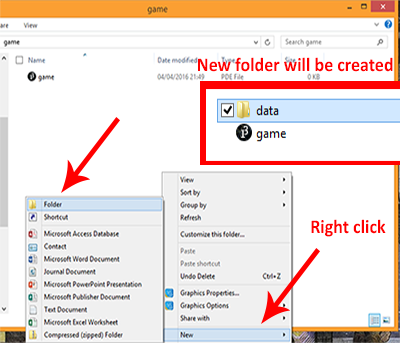
Open up the folder in desktop
and right click.
Select "New" and then "Folder".
This will be our images and fonts.
Once you've done that, open up
the game file that's there.
Note: Download the files below
to put into the data folder.
Open up the folder in desktop
and right click.
Select "New" and then "Folder".
This will be our images and fonts.
Once you've done that, open up
the game file that's there.
Note: Download the files below
to put into the data folder.
Step 3
Once you did the previous steps,
you need to create your game
skeleton. We can do that
by creating variables.
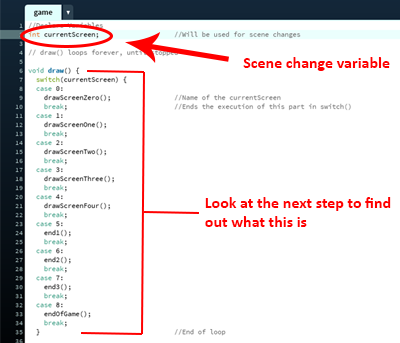
Create the scene change variable.
Let's call it "currentScreen".
Now we need to create a loop.
Once you did the previous steps,
you need to create your game
skeleton. We can do that
by creating variables.
Create the scene change variable.
Let's call it "currentScreen".
Now we need to create a loop.
Step 4
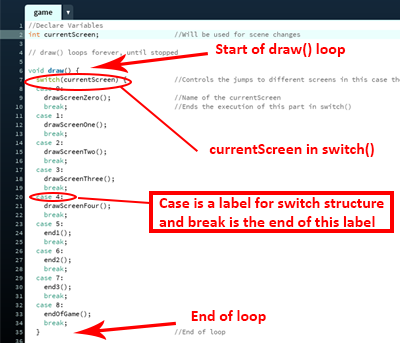
Create a draw() loop for the scenes to
change when we have a command.
Add a switch to the currentScreen
variable. In the switch() structure,
Cases and breaks will let you
label scenes.
Create a scene title in each case.
Create a draw() loop for the scenes to
change when we have a command.
Add a switch to the currentScreen
variable. In the switch() structure,
Cases and breaks will let you
label scenes.
Create a scene title in each case.
Step 5
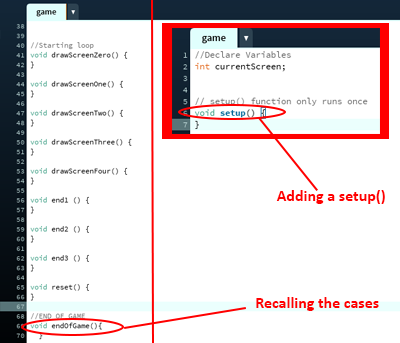
In order to re-call cases and draw
loop later on in the code, use void
and the case title followed after
with a loop.
Now we need to add the setup() loop
to initialize the canvas and finish
the game skeleton.
In order to re-call cases and draw
loop later on in the code, use void
and the case title followed after
with a loop.
Now we need to add the setup() loop
to initialize the canvas and finish
the game skeleton.
Step 6
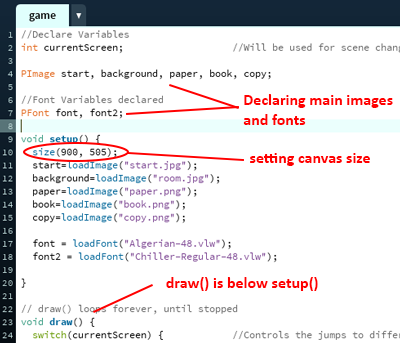
Last step to finishing the skeleton
of the game is to add the main
image and font variables.
We also need to define our
canvas settings in setup().
Copy the code as outlined, then
load image variables and fonts
in the setup loop.
Last step to finishing the skeleton
of the game is to add the main
image and font variables.
We also need to define our
canvas settings in setup().
Copy the code as outlined, then
load image variables and fonts
in the setup loop.
Step 7
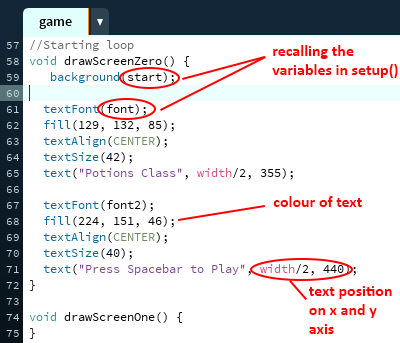
Now that the main structure is done,
we can start adding content to
our scenes made previously.
All we need to do is, tell
the application to recall
the variables that we used
in setup().
This is our "Start" screen.
Now that the main structure is done,
we can start adding content to
our scenes made previously.
All we need to do is, tell
the application to recall
the variables that we used
in setup().
This is our "Start" screen.
Step 8
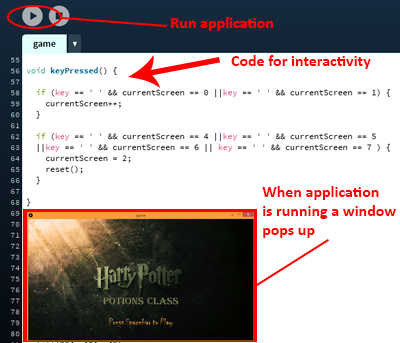
Click the Run button to see how
the start looks so far.
We need to create interactivity,
between the scenes.
To do so, use keyPressed().
We will use an if loop to determine
which key needs to be pressed
in order for the currentScreen
variable to change and switch
to a different case.
Click the Run button to see how
the start looks so far.
We need to create interactivity,
between the scenes.
To do so, use keyPressed().
We will use an if loop to determine
which key needs to be pressed
in order for the currentScreen
variable to change and switch
to a different case.
Step 9
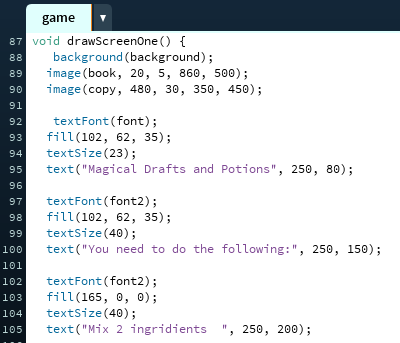
Now we need to create instructions
of the game in the next screen.
By using fonts and the image
variables declared previously,
all we need to do is position
them the way we want and.
Click here to get the full code.
Now we need to create instructions
of the game in the next screen.
By using fonts and the image
variables declared previously,
all we need to do is position
them the way we want and.
Click here to get the full code.
Step 10
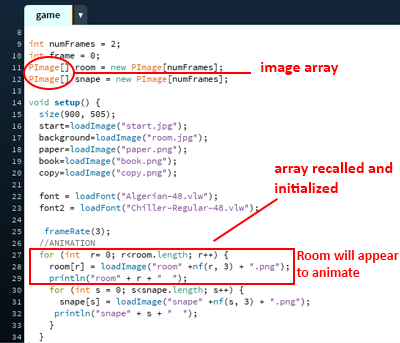
For the main game, some sort of
animation is needed. Which is why
using an array is a good choice.
Create new variables above your
main code, and then declare
PImage array like on the left.
Create a frameRate for your
animation, and then a for loop
to have it running.
For the main game, some sort of
animation is needed. Which is why
using an array is a good choice.
Create new variables above your
main code, and then declare
PImage array like on the left.
Create a frameRate for your
animation, and then a for loop
to have it running.
Step 11
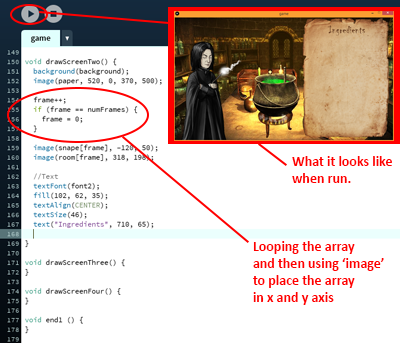
Most of the structure variables are
set up, now we need to add the
arrays we declared to our scenes.
Copy the code on the left or
Click here to get the code.
We will use the image function once
again to recall our array png files
and position them.
Most of the structure variables are
set up, now we need to add the
arrays we declared to our scenes.
Copy the code on the left or
Click here to get the code.
We will use the image function once
again to recall our array png files
and position them.
Step 12
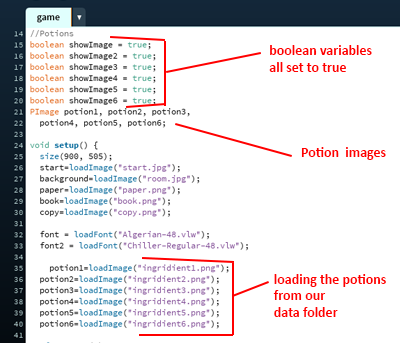
It's time to create our potions.
In the game the user will need
to click two ingredients to create
the actual potions.
When they choose their ingredient,
it will disappear. To do that we
will use a boolean data type.
Declare the variables like on the
left and load them in setup().
It's time to create our potions.
In the game the user will need
to click two ingredients to create
the actual potions.
When they choose their ingredient,
it will disappear. To do that we
will use a boolean data type.
Declare the variables like on the
left and load them in setup().
Step 13
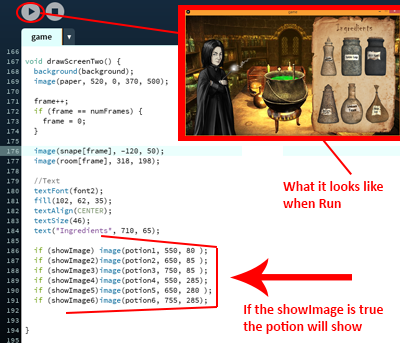
Go back to currentScreenTwo()
code and add in the if loop
statements for each
of the ingridients and their position
on the x and y axis.
Run the code to see if it works.
Click here to get the code so far.
Go back to currentScreenTwo()
code and add in the if loop
statements for each
of the ingridients and their position
on the x and y axis.
Run the code to see if it works.
Click here to get the code so far.
Step 14
Now we need to create our
Combinations for the ingredients.
Go back to the code start.
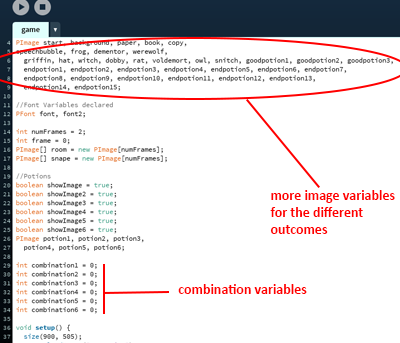
Add the combination variables and
add images for the different
outcomes. We will use all the
images that are in the data folder.
You may have noticed we're using
int data type for numeral values. This
is the best data type to use.
Now we need to create our
Combinations for the ingredients.
Go back to the code start.
Add the combination variables and
add images for the different
outcomes. We will use all the
images that are in the data folder.
You may have noticed we're using
int data type for numeral values. This
is the best data type to use.
Step 15
Once you have your combinations
ready, and declared the image
variables, recall the variables
in setup().
Click here to get the code so far.
We can now start creating the
screen changes and game itself.
Once you have your combinations
ready, and declared the image
variables, recall the variables
in setup().
Click here to get the code so far.
We can now start creating the
screen changes and game itself.

Step 16
Let's finish the design
of our scences.
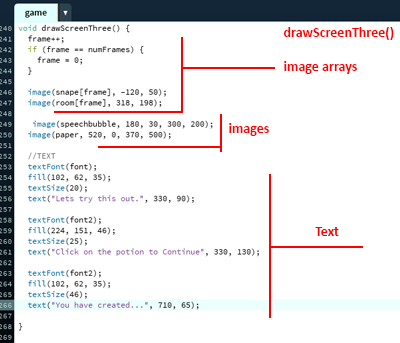
Go back to drawScreenThree()
and repeat the same process as
for drawScreenTwo().
Add arrays, images and fonts.
Let's finish the design
of our scences.
Go back to drawScreenThree()
and repeat the same process as
for drawScreenTwo().
Add arrays, images and fonts.
Step 17
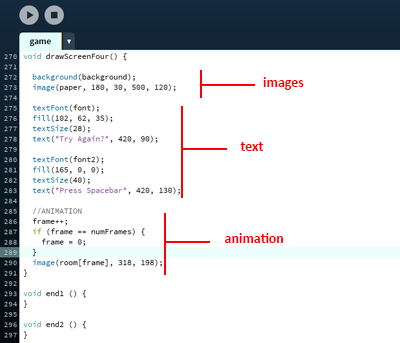
The last part to this section
is to add in content to
drawScreenFour() scene.
Once again, add in arrays,
images and fonts.
The last part to this section
is to add in content to
drawScreenFour() scene.
Once again, add in arrays,
images and fonts.
Step 18
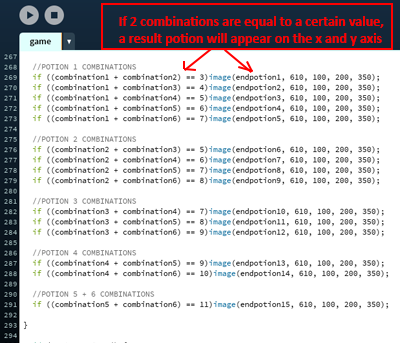
This section will cover the combination
variables that we declared.
Go to currentScreenThree() scene
and create if statements with the
combinations on the left.
Then after each statement, recall
our result potions (endpotion) and
position them on x and y axis.
This section will cover the combination
variables that we declared.
Go to currentScreenThree() scene
and create if statements with the
combinations on the left.
Then after each statement, recall
our result potions (endpotion) and
position them on x and y axis.
Step 19
Now we need to create bad potion
combination results.
These are the creatures that the
character will turn into if the
ingredient combination was wrong.
Go to currentScreenFour()
scene and add the following
code on the left.
Now we need to create bad potion
combination results.
These are the creatures that the
character will turn into if the
ingredient combination was wrong.
Go to currentScreenFour()
scene and add the following
code on the left.
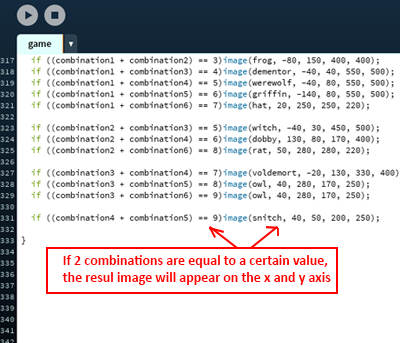
Step 20
We will use combinations for
interactivity using mousePressed()
function.
When our currentScreen is equal
to 2, and the user clicks along the
x and y co-ordinates like on the left,
the combination variable will store
the new value.
We will use combinations for
interactivity using mousePressed()
function.
When our currentScreen is equal
to 2, and the user clicks along the
x and y co-ordinates like on the left,
the combination variable will store
the new value.
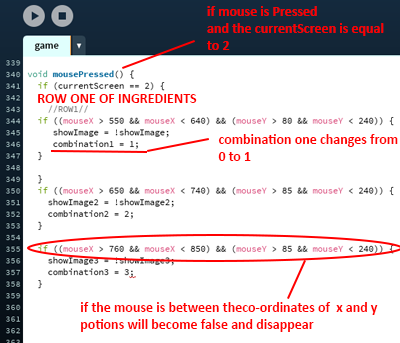
Step 21
Now we need to add the second
row of ingredients to our
combination mousePressed()
function.
Use the same method as in
the previous step.
Now we need to add the second
row of ingredients to our
combination mousePressed()
function.
Use the same method as in
the previous step.
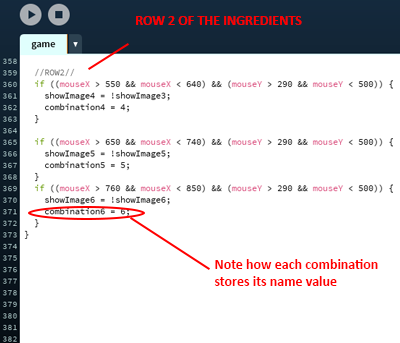
Step 22
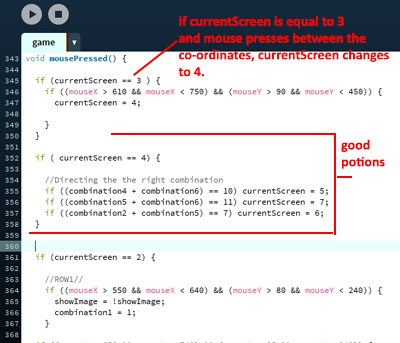
Using the combination variable
results from the user , depending
on where they click, and creating
scene changes.
The code on the left shows
the layout of the loop.
The combination values are shown
in red. This code needs to be
inside the mousePressed() loop.
Using the combination variable
results from the user , depending
on where they click, and creating
scene changes.
The code on the left shows
the layout of the loop.
The combination values are shown
in red. This code needs to be
inside the mousePressed() loop.
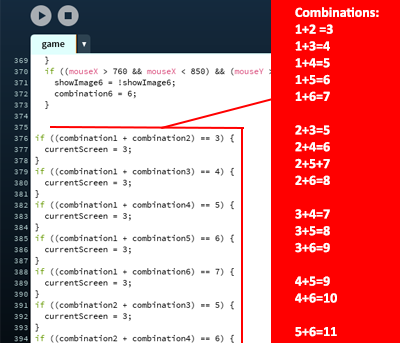
Step 23
Last step in this section is
to allow the proper scene
change when user clicks on the
finished potion. We will use
another if loop like the
code on the left.
Click here to get the full code.
Last step in this section is
to allow the proper scene
change when user clicks on the
finished potion. We will use
another if loop like the
code on the left.
Click here to get the full code.
Step 24
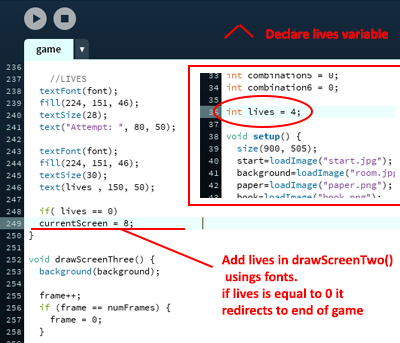
Declare a "lives" variable at
the start of the code. Then recall
it in drawScreenTwo().
When lives will be equal to zero,
the game will end.
We are setting the lives to Four
so that the user has a chance
to guess the right potion.
Declare a "lives" variable at
the start of the code. Then recall
it in drawScreenTwo().
When lives will be equal to zero,
the game will end.
We are setting the lives to Four
so that the user has a chance
to guess the right potion.
Step 25
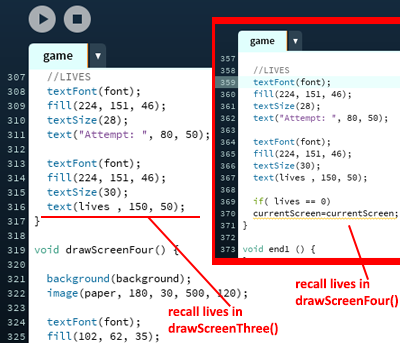
Add the newly created lives variable
to end of drawScreenThree()
code and drawScreenFour like
outlined on the left.
Click here to get the code.
Add the newly created lives variable
to end of drawScreenThree()
code and drawScreenFour like
outlined on the left.
Click here to get the code.
Step 26
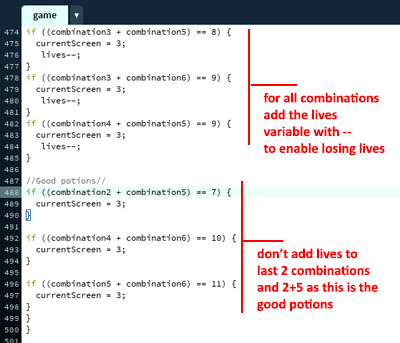
The last part to this section is
to add in lives--; code in the
combinations we have at the
end of the code.
This will enable a lives system,
where the user will lose
a life once the combination
of the ingredients they chose
was wrong.
The last part to this section is
to add in lives--; code in the
combinations we have at the
end of the code.
This will enable a lives system,
where the user will lose
a life once the combination
of the ingredients they chose
was wrong.
Step 27
In this section we will be adding
the different potion results that
are successful. There are only three.
Copy the code in the link below or
create your own text.
Click here to get the code.
In this section we will be adding
the different potion results that
are successful. There are only three.
Copy the code in the link below or
create your own text.
Click here to get the code.
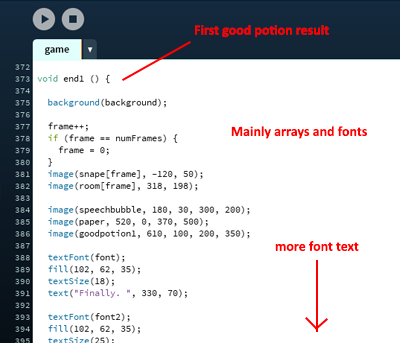
Step 28
Add a similar code to the
second end() result.
This is will replace the first image.
Copy the code in the link below or
create your own text.
Click here to get the code.
Add a similar code to the
second end() result.
This is will replace the first image.
Copy the code in the link below or
create your own text.
Click here to get the code.
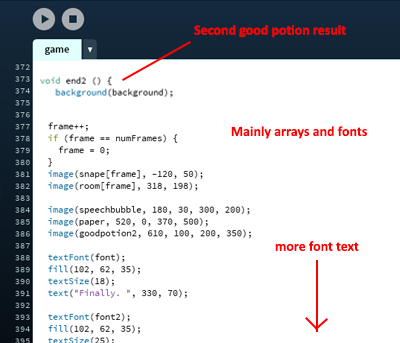
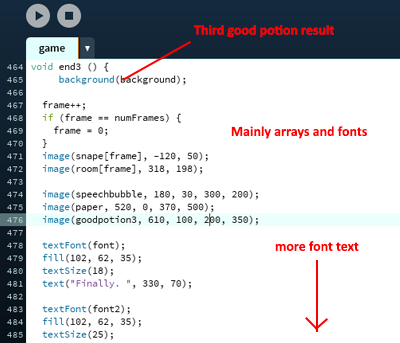
Step 29
Add the last end result code
with the similar code as before.
This is will replace the second image.
Copy the code in the link below or
create your own text.
Click here to get the code.
Add the last end result code
with the similar code as before.
This is will replace the second image.
Copy the code in the link below or
create your own text.
Click here to get the code.
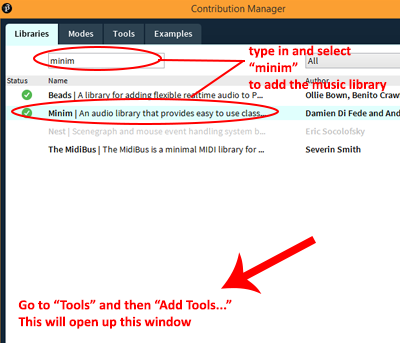
Step 30
In order to have sound, we need
to import a music library.
Go to "Tools" and then "Add Tools..."
Type in minim and select
and download the library.
In order to have sound, we need
to import a music library.
Go to "Tools" and then "Add Tools..."
Type in minim and select
and download the library.
Step 31
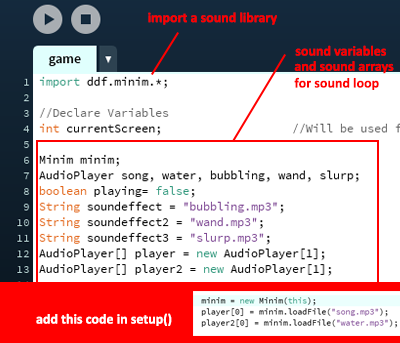
Now all you need to do is
to declare the input before
all of your code and recall it,
in setup().
You can now use
the code in any part
of the game
Now all you need to do is
to declare the input before
all of your code and recall it,
in setup().
You can now use
the code in any part
of the game
Step 32
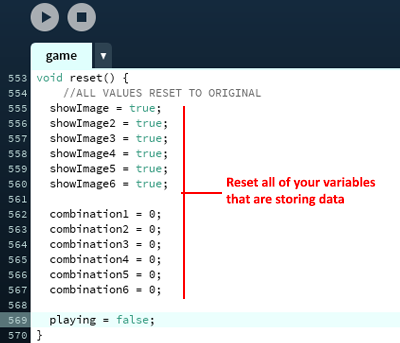
You need to reset some variables
in order for the others
to move smooth.
We declared a reset variable back
when we declared keyPressed().
All you need to do now is go into
the reset() code block you made
at the end and type in the
code on the left.
You need to reset some variables
in order for the others
to move smooth.
We declared a reset variable back
when we declared keyPressed().
All you need to do now is go into
the reset() code block you made
at the end and type in the
code on the left.
Step 33
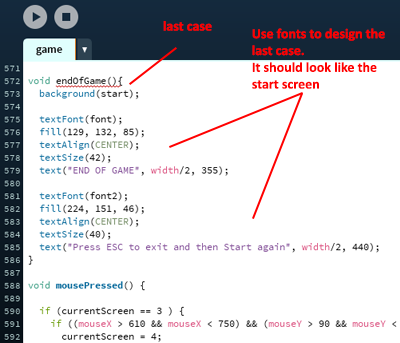
Final Step is to create the ending
screen. It's almost the same
as the starting screen
however you need to change
the text.
This is all for
this tutorial, make sure to
check the code below!
Final Step is to create the ending
screen. It's almost the same
as the starting screen
however you need to change
the text.
This is all for
this tutorial, make sure to
check the code below!
CODE
Simplified Game Skeleton
//Screen change variable declared
int currentScreen;                                //Variable to create the different scenes(screens) for interaction
//Font Variables declared
PFont font, font2;                           //Declare PFont variable


// setup() function only runs once
void setup() {                                                  //Start of setup loop
}
//end of loop

// draw() loops forever, until stopped

void draw() {                        //Start of draw loop
  switch(currentScreen) {            //Controls the jumps to different screens in this case the integer which is currentScreen
  case 0:                            //Cases are the value of currentScreen
    drawScreenZero();                //Name of the first currentScreen
    break;                           //Ends the execution of this part in switch()
  case 1:                            //currentScreen is now 1
    drawScreenOne();                 //Name of the second currentScreen
    break;                           //Ends the execution of this part in switch()
  case 2:                            //currentScreen is now 2
    drawScreenTwo();                 //Name of the third currentScreen
    break;                           //Ends the execution of this part in switch()
  case 3:                            //currentScreen is now 3
    drawScreenThree();               //Name of the fourth currentScreen
    break;                           //Ends the execution of this part in switch()
  case 4:                            //currentScreen is now 4
    drawScreenFour();                //Name of the fifth currentScreen
    break;                           //Ends the execution of this part in switch()
  case 5:                            //currentScreen is now 5
    end1();                          //Name for the end result
    break;                           //Ends the execution of this part in switch()
  case 6:                            //currentScreen is now 6
    end2();                          //Name for the second end result
    break;                           //Ends the execution of this part in switch()
  case 7:                            //currentScreen is now 7
    end3();                          //Name for the third end result
    break;                           //Ends the execution of this part in switch()
  case 8:                            //If the currentScreen is now 8 that means its the end of the game
    endOfGame();                     //Name of the last screen
    break;                           //Ends the execution of this part in switch()
  }
}
//end of loop

//Drawing the currentScreen 0
void drawScreenZero() {
 }
//end of loop
//Drawing the currentScreen 1
void drawScreenOne() {
}
//end of loop
//Drawing the currentScreen 2
void drawScreenTwo() {
 }
//end of loop
//Drawing the currentScreen 3
  }
//end of loop
//Drawing the currentScreen 4
void drawScreenFour() {
  }
//end of loop
//Drawing the result screen 5
void end1 () {
  }
//end of loop{//Drawing the result screen 6
void end2 () {
  }
//end of loop
//Drawing the result screen 7
void end3 () {
  }
//end of loop{//The reset variable which is recalled in the if keyPressed statement
void reset() {
  }
//end of loop
//END OF GAME
void endOfGame(){
  }
//end of loop
All Variables
//Audio
Minim minim;                                      //Sound player variable
AudioPlayer song, water, bubbling, wand, slurp;   //Audio song variable names
boolean playing= false;                           //Boolean to show the song is playing
String soundeffect = "bubbling.mp3";              //Loading a music file
String soundeffect2 = "wand.mp3";                 //Loading a music file
String soundeffect3 = "slurp.mp3";                //Loading a music file
AudioPlayer[] player = new AudioPlayer[1];        //Creating a player array so the song plays in a loop
AudioPlayer[] player2 = new AudioPlayer[1];       //Creating a player array so the song plays in a loop

//Screen change variable declared
int currentScreen;                                //Variable to create the different scenes(screens) for interaction

//Image variables declared
PImage start, background, paper, book, copy, speechbubble, frog, dementor, werewolf,
  griffin, hat, witch, dobby, rat, voldemort, owl, snitch, goodpotion1, goodpotion2, goodpotion3,
  endpotion1, endpotion2, endpotion3, endpotion4, endpotion5, endpotion6, endpotion7,
  endpotion8, endpotion9, endpotion10, endpotion11, endpotion12, endpotion13,
  endpotion14, endpotion15;

//Font Variables declared
PFont font, font2;                           //Declare PFont variable

// Variables for animation
int numFrames = 2;                           //The number of frames in the animation
int frame = 0;                               //Frame variable which will be used to distinguish the pace of the animation
PImage[] room = new PImage[numFrames];       //Image array for the cauldron animation
PImage[] snape = new PImage[numFrames];      //Image array for Snape blinking

//Potions
boolean showImage = true;                   //The ingredient potions appearing is true but will disappear once set to "false"
boolean showImage2 = true;
boolean showImage3 = true;
boolean showImage4 = true;
boolean showImage5 = true;
boolean showImage6 = true;

int combination1 = 0;                       //Combination integers which is used to create a mixture for 2 potions
int combination2 = 0;
int combination3 = 0;
int combination4 = 0;
int combination5 = 0;
int combination6 = 0;

PImage potion1, potion2, potion3,           //Creating variables for the potions images
  potion4, potion5, potion6;

int lives = 4;                              //Lives will start at 4
Interactivity + Combinations
//If the key is pressed this fuction will activate in a loop
void keyPressed() {

  if (key == ' ' && currentScreen == 0 ||key == ' ' && currentScreen == 1) {              //If Spacebar is pressed and currentScreen is 0 OR 1
    currentScreen++;                                                                      //Then currentScreen will add 1 and move on to the next currentScreen
  }

  if (key == ' ' && currentScreen == 4 ||key == ' ' && currentScreen == 5                 //If Spacebar is pressed and currentScreen is 4 OR 5 OR 6 OR 7
  ||key == ' ' && currentScreen == 6 || key == ' ' && currentScreen == 7 ) {
    currentScreen = 2;                                                                    //then it will go back to screen 2
    reset();                                                                              //And reset variable will activate
  }

}
//end of loop
void mousePressed() {

  //If the currentScreen is equal to 3 and the mouse is pressed is in the accordinates below then
  if (currentScreen == 3 ) {
    if ((mouseX > 610 && mouseX < 750) && (mouseY > 90 && mouseY < 450)) {
      currentScreen = 4;                          //the currentScreen changes to 4
      playing = false;                            //and playing is false
      {
        slurp=minim.loadFile(soundeffect3);       //The music is playing on loop and turns playing on so that it will constantly play when this setting is active
        slurp.play();
        playing=true;
      }
    }
  }

  //If the currentScreen is equal to 4 and the combinations are equal to numbers outlined before then the currentScreen will be re-directed
  if ( currentScreen == 4) {

    //Directing the the right combination
    if ((combination4 + combination6) == 10) currentScreen = 5;
    if ((combination5 + combination6) == 11) currentScreen = 7;
    if ((combination2 + combination5) == 7) currentScreen = 6;
  }

  //If the currentScreen is equal to 2 the images will dissapear based on the co-ordinates that were clicked. The music will also play and combination variables will be assigned a number
  //which will give us the ability to use them when creating the different images to appear s
  //ROW 1//
  if (currentScreen == 2) {                                                   //If current screen is equal to 2
    if ((mouseX > 550 && mouseX < 640) && (mouseY > 80 && mouseY < 240)) {    //And the mouse clicks on the places outlined
      showImage = !showImage;                                                 //The image disappears when clicked
      combination1 = 1;                                                       //The combination will equal to the number outlined
      playing = false;                                                        //Playing will turn to false
      {
        bubbling=minim.loadFile(soundeffect);       //The music is playing on loop and turns playing on so that it will constantly play when this setting is active
        bubbling.play();
        playing=true;
      }
    }

    if ((mouseX > 650 && mouseX < 740) && (mouseY > 85 && mouseY < 240)) {    //And the mouse clicks on the places outlined
      showImage2 = !showImage2;                                               //The image disappears when clicked
      combination2 = 2;                                                       //The combination will equal to the number outlined
      playing = false;                                                        //Playing will turn to false
      {
        bubbling=minim.loadFile(soundeffect);       //The music is playing on loop and turns playing on so that it will constantly play when this setting is active
        bubbling.play();
        playing=true;
      }
    }
    if ((mouseX > 760 && mouseX < 850) && (mouseY > 85 && mouseY < 240)) {    //And the mouse clicks on the places outlined
      showImage3 = !showImage3;                                               //The image disappears when clicked
      combination3 = 3;                                                       //The combination will equal to the number outlined
      playing = false;                                                        //Playing will turn to false
      {
        bubbling=minim.loadFile(soundeffect);       //The music is playing on loop and turns playing on so that it will constantly play when this setting is active
        bubbling.play();
        playing=true;
      }
    }
    //ROW2//
    if ((mouseX > 550 && mouseX < 640) && (mouseY > 290 && mouseY < 500)) {    //And the mouse clicks on the places outlined
      showImage4 = !showImage3;                                                //The image disappears when clicked
      combination4 = 4;                                                        //The combination will equal to the number outlined
      playing = false;                                                         //Playing will turn to false
      {
        bubbling=minim.loadFile(soundeffect);       //The music is playing on loop and turns playing on so that it will constantly play when this setting is active
        bubbling.play();
        playing=true;
      }
    }
    if ((mouseX > 650 && mouseX < 740) && (mouseY > 290 && mouseY < 500)) {    //And the mouse clicks on the places outlined
      showImage5 = !showImage5;                                                //The image disappears when clicked
      combination5 = 5;                                                        //The combination will equal to the number outlined
      playing = false;                                                         //Playing will turn to false
      {
        bubbling=minim.loadFile(soundeffect);       //The music is playing on loop and turns playing on so that it will constantly play when this setting is active
        bubbling.play();
        playing=true;
      }
    }
    if ((mouseX > 760 && mouseX < 850) && (mouseY > 290 && mouseY < 500)) {    //And the mouse clicks on the places outlined
      showImage6 = !showImage6;                                                //The image disappears when clicked
      combination6 = 6;                                                        //The combination will equal to the number outlined
      playing = false;                                                         //Playing will turn to false
      {
        bubbling=minim.loadFile(soundeffect);       //The music is playing on loop and turns playing on so that it will constantly play when this setting is active
        bubbling.play();
        playing=true;
      }
    }

    //COMBINATION RESULTS

    //If the combinationes are equal to the numbers outlined then the currentScreen will redirect to 3 and the sound will play
    if ((combination1 + combination2) == 3) {
      currentScreen = 3;
      playing = false;
      lives--;                                   //One life will be taken away
      {
        wand=minim.loadFile(soundeffect2);       //The music is playing on loop and turns playing on so that it will constantly play when this setting is active
        wand.play();
        playing=true;
      }
    }

    //If the combinationes are equal to the numbers outlined then the currentScreen will redirect to 3 and the sound will play
    if ((combination1 + combination3) == 4) {
      currentScreen = 3;
      playing = false;
      lives--;                                   //One life will be taken away
      {
        wand=minim.loadFile(soundeffect2);       //The music is playing on loop and turns playing on so that it will constantly play when this setting is active
        wand.play();
        playing=true;
      }
    }

    //If the combinationes are equal to the numbers outlined then the currentScreen will redirect to 3 and the sound will play
    if ((combination1 + combination4) == 5) {
      currentScreen = 3;
      playing = false;
      lives--;                                   //One life will be taken away
      {
        wand=minim.loadFile(soundeffect2);       //The music is playing on loop and turns playing on so that it will constantly play when this setting is active
        wand.play();
        playing=true;
      }
    }

    //If the combinationes are equal to the numbers outlined then the currentScreen will redirect to 3 and the sound will play
    if ((combination1 + combination5) == 6) {
      currentScreen = 3;
      playing = false;
      lives--;                                   //One life will be taken away
      {
        wand=minim.loadFile(soundeffect2);       //The music is playing on loop and turns playing on so that it will constantly play when this setting is active
        wand.play();
        playing=true;
      }
    }

    //If the combinationes are equal to the numbers outlined then the currentScreen will redirect to 3 and the sound will play
    if ((combination1 + combination6) == 7) {
      currentScreen = 3;
      playing = false;
      lives--;                                   //One life will be taken away
      {
        wand=minim.loadFile(soundeffect2);       //The music is playing on loop and turns playing on so that it will constantly play when this setting is active
        wand.play();
        playing=true;
      }
    }

    //If the combinationes are equal to the numbers outlined then the currentScreen will redirect to 3 and the sound will play
    if ((combination2 + combination3) == 5) {
      currentScreen = 3;
      playing = false;
      lives--;                                   //One life will be taken away
      {
        wand=minim.loadFile(soundeffect2);       //The music is playing on loop and turns playing on so that it will constantly play when this setting is active
        wand.play();
        playing=true;
      }
    }

    //If the combinationes are equal to the numbers outlined then the currentScreen will redirect to 3 and the sound will play
    if ((combination2 + combination4) == 6) {
      currentScreen = 3;
      playing = false;
      lives--;                                   //One life will be taken away
      {
        wand=minim.loadFile(soundeffect2);       //The music is playing on loop and turns playing on so that it will constantly play when this setting is active
        wand.play();
        playing=true;
      }
    }

    //If the combinationes are equal to the numbers outlined then the currentScreen will redirect to 3 and the sound will play
    if ((combination2 + combination5) == 7) {
      currentScreen = 3;
      playing = false;
      {
        wand=minim.loadFile(soundeffect2);       //The music is playing on loop and turns playing on so that it will constantly play when this setting is active
        wand.play();
        playing=true;
      }
    }

    //If the combinationes are equal to the numbers outlined then the currentScreen will redirect to 3 and the sound will play
    if ((combination2 + combination6) == 8) {
      currentScreen = 3;
      playing = false;
      lives--;                                   //One life will be taken away
      {
        wand=minim.loadFile(soundeffect2);       //The music is playing on loop and turns playing on so that it will constantly play when this setting is active
        wand.play();
        playing=true;
      }
    }

    //If the combinationes are equal to the numbers outlined then the currentScreen will redirect to 3 and the sound will play
    if ((combination3 + combination4) == 7) {
      currentScreen = 3;
      playing = false;
      lives--;                                   //One life will be taken away
      {
        wand=minim.loadFile(soundeffect2);       //The music is playing on loop and turns playing on so that it will constantly play when this setting is active
        wand.play();
        playing=true;
      }
    }

    //If the combinationes are equal to the numbers outlined then the currentScreen will redirect to 3 and the sound will play
    if ((combination3 + combination5) == 8) {
      currentScreen = 3;
      playing = false;
      lives--;                                   //One life will be taken away
      {
        wand=minim.loadFile(soundeffect2);       //The music is playing on loop and turns playing on so that it will constantly play when this setting is active
        wand.play();
        playing=true;
      }
    }

    //If the combinationes are equal to the numbers outlined then the currentScreen will redirect to 3 and the sound will play
    if ((combination3 + combination6) == 9) {
      currentScreen = 3;
      playing = false;
      lives--;                                   //One life will be taken away
      {
        wand=minim.loadFile(soundeffect2);       //The music is playing on loop and turns playing on so that it will constantly play when this setting is active
        wand.play();
        playing=true;
      }
    }

    //If the combinationes are equal to the numbers outlined then the currentScreen will redirect to 3 and the sound will play
    if ((combination4 + combination5) == 9) {
      currentScreen = 3;
      playing = false;
      lives--;                                   //One life will be taken away
      {
        wand=minim.loadFile(soundeffect2);       //The music is playing on loop and turns playing on so that it will constantly play when this setting is active
        wand.play();
        playing=true;
      }
    }

    //If the combinationes are equal to the numbers outlined then the currentScreen will redirect to 3 and the sound will play
    if ((combination4 + combination6) == 10) {
      currentScreen = 3;
      playing = false;
      {
        wand=minim.loadFile(soundeffect2);       //The music is playing on loop and turns playing on so that it will constantly play when this setting is active
        wand.play();
        playing=true;
      }
    }

    //If the combinationes are equal to the numbers outlined then the currentScreen will redirect to 3 and the sound will play
    if ((combination5 + combination6) == 11) {
      currentScreen = 3;
      playing = false;
      {
        wand=minim.loadFile(soundeffect2);       //The music is playing on loop and turns playing on so that it will constantly play when this setting is active
        wand.play();
        playing=true;
      }
    }
  }
}
//End of Loop
Full setup()
// setup() function only runs once

void setup() {                                                  //Start of setup loop
  size(900, 505);                                               //Canvas size

  //Loads the image by the name in the brackets

  start=loadImage("start.jpg");
  background=loadImage("room.jpg");
  paper=loadImage("paper.png");
  book=loadImage("book.png");
  copy=loadImage("copy.png");
  speechbubble=loadImage("speechbubble.png");

  font = loadFont("Algerian-48.vlw");                           //Loads the font from the Data folder
  font2 = loadFont("Chiller-Regular-48.vlw");                   //Loads the font from the Data folder

  frameRate(3);                                                 //The rate at which the frames will load making it move faster or slower

  //ANIMATION
  for (int  r= 0; r<room.length; r++) {                         //Loop sequential array
    room[r] = loadImage("room" +nf(r, 3) + ".png");             //nf() is used to help the computer find the file, the 3 is the number of number characters my file has ex. room000
    println("room" + r + "  ");                                 //println() is used to debug and see what is going on in the process

    for (int s = 0; s<snape.length; s++) {                      //Loop sequential array
      snape[s] = loadImage("snape" +nf(s, 3) + ".png");         //nf() is used to help the computer find the file, the 3 is the number of number characters my file has ex. room000
     println("snape" + s + "  ");                               //println() is used to debug and see what is going on in the process
    }
  }


  //AUDIO
  minim = new Minim(this);                                      //Loads the minim variable and using the import from the library to activate the song

  // this loads mysong.wmp3 from the data folder

  player[0] = minim.loadFile("song.mp3");                       //Loads the files in the brackets
  player2[0] = minim.loadFile("water.mp3");

  //POTIONS

  //Loads the image by the name in the brackets

  potion1=loadImage("ingridient1.png");
  potion2=loadImage("ingridient2.png");
  potion3=loadImage("ingridient3.png");
  potion4=loadImage("ingridient4.png");
  potion5=loadImage("ingridient5.png");
  potion6=loadImage("ingridient6.png");

  //POTION 1 COMBINATIONS

  //Loads the images by the name in the brackets

  endpotion1=loadImage("potion1.png");
  endpotion2=loadImage("potion2.png");
  endpotion3=loadImage("potion3.png");
  endpotion4=loadImage("potion4.png");
  endpotion5=loadImage("potion5.png");
  endpotion6=loadImage("potion6.png");
  endpotion7=loadImage("potion7.png");
  endpotion8=loadImage("potion8.png");
  endpotion9=loadImage("potion9.png");
  endpotion10=loadImage("potion10.png");
  endpotion11=loadImage("potion11.png");
  endpotion12=loadImage("potion12.png");
  endpotion13=loadImage("potion13.png");
  endpotion14=loadImage("potion14.png");
  endpotion15=loadImage("potion15.png");

  //POTION RESULTS

  //Loads the images in the brackets which are the combination results

  frog = loadImage("frog.png");
  dementor = loadImage("dementor.png");
  werewolf = loadImage("werewolf.png");
  griffin = loadImage("griffin.png");
  hat = loadImage("hat.png");
  witch = loadImage("witch.png");
  dobby = loadImage("dobby.png");
  rat = loadImage("rat.png");
  voldemort = loadImage("voldemort.png");
  owl = loadImage("owl.png");
  snitch = loadImage("snitch.png");
  goodpotion1 = loadImage("goodpotion1.png");
  goodpotion2 = loadImage("goodpotion2.png");
  goodpotion3 = loadImage("goodpotion3.png");
}
//end of loop
STEP CODE
Step 9 Code
//Drawing the currentScreen 0
void drawScreenZero() {
  background(start);                                //Background image is loaded from the setup in the name of "start"

  textFont(font);                                   //Font loaded from setup
  fill(129, 132, 85);                               //Dark green color will be filled
  textAlign(CENTER);                                //Text is aligned in the center
  textSize(42);                                     //The size of the text
  text("Potions Class", width/2, 355);              //The text and where its placed in an x and y manner

  textFont(font2);                                  //Font loaded from setup
  fill(224, 151, 46);                               //Orange color will be filled
  textAlign(CENTER);                                //Text is aligned in the center
  textSize(40);                                     //The size of the text
  text("Press Spacebar to Play", width/2, 440);     //The text and where its placed in an x and y manner
}
//end of loop
Step 11 Code
//Drawing the currentScreen 2
void drawScreenTwo() {

  background(background);                            //Background image is loaded from the setup in the name of "background"
  image(paper, 520, 0, 370, 500);   //Image of "paper" is loaded and its place in x and y axis as well as its size in width and height

  //ANIMATION
  //Snape and Cauldron
  frame++;                                         //The frame will add 1
  if (frame == numFrames) {                        //If the frame is equal to the numFaces variable the frame will be equal to 0 making the animation constantly run
    frame = 0;
  }
  //The array images have now a value of "frames" which above is equal to the "numFaces" , its placed in the x and y axis
  image(snape[frame], -120, 50);
  image(room[frame], 318, 198);

  //Text
  textFont(font2);                                 //Font2 loaded from setup
  fill(102, 62, 35);                               //Dark brown color will be filled
  textAlign(CENTER);                               //Text is aligned in the center
  textSize(46);                                    //The text size
  text("Ingredients", 710, 65);                    //The text and its location on the x and y axis
Step 13 Code
//Drawing the currentScreen 2
void drawScreenTwo() {

  background(background);                            //Background image is loaded from the setup in the name of "background"
  image(paper, 520, 0, 370, 500);                    //Image of "paper" is loaded and its place in x and y axis as well as its size in width and height

  //ANIMATION
  //Snape and Cauldron
  frame++;                                         //The frame will add 1
  if (frame == numFrames) {                        //If the frame is equal to the numFaces variable the frame will be equal to 0 making the animation constantly run
    frame = 0;
  }
  //The array images have now a value of "frames" which above is equal to the "numFaces" , its placed in the x and y axis
  image(snape[frame], -120, 50);
  image(room[frame], 318, 198);

  //Text
  textFont(font2);                                 //Font2 loaded from setup
  fill(102, 62, 35);                               //Dark brown color will be filled
  textAlign(CENTER);                               //Text is aligned in the center
  textSize(46);                                    //The text size
  text("Ingredients", 710, 65);                    //The text and its location on the x and y axis

  //POTIONS

  //showImage(s) booleans used to have the potion appear or dissapear when clicked
  if (showImage) image(potion1, 550, 80 );         //If showImage (which is true as initialized at the start) then the image potion1 will appear and be on co-ordinates x and y
  if (showImage2)image(potion2, 650, 85 );         //If showImage2 (which is true as initialized at the start) then the image potion2 will appear and be on co-ordinates x and y
  if (showImage3)image(potion3, 750, 85 );         //If showImage3 (which is true as initialized at the start) then the image potion3 will appear and be on co-ordinates x and y
  if (showImage4)image(potion4, 550, 285);         //If showImage4 (which is true as initialized at the start) then the image potion4 will appear and be on co-ordinates x and y
  if (showImage5)image(potion5, 650, 280 );        //If showImage5 (which is true as initialized at the start) then the image potion5 will appear and be on co-ordinates x and y
  if (showImage6)image(potion6, 755, 285);         //If showImage6 (which is true as initialized at the start) then the image potion6 will appear and be on co-ordinates x and y
}
Step 15 Code
 //POTION 1 COMBINATIONS

  //Loads the images by the name in the brackets

  endpotion1=loadImage("potion1.png");
  endpotion2=loadImage("potion2.png");
  endpotion3=loadImage("potion3.png");
  endpotion4=loadImage("potion4.png");
  endpotion5=loadImage("potion5.png");
  endpotion6=loadImage("potion6.png");
  endpotion7=loadImage("potion7.png");
  endpotion8=loadImage("potion8.png");
  endpotion9=loadImage("potion9.png");
  endpotion10=loadImage("potion10.png");
  endpotion11=loadImage("potion11.png");
  endpotion12=loadImage("potion12.png");
  endpotion13=loadImage("potion13.png");
  endpotion14=loadImage("potion14.png");
  endpotion15=loadImage("potion15.png");

  //POTION RESULTS

  //Loads the images in the brackets which are the combination results

  frog = loadImage("frog.png");
  dementor = loadImage("dementor.png");
  werewolf = loadImage("werewolf.png");
  griffin = loadImage("griffin.png");
  hat = loadImage("hat.png");
  witch = loadImage("witch.png");
  dobby = loadImage("dobby.png");
  rat = loadImage("rat.png");
  voldemort = loadImage("voldemort.png");
  owl = loadImage("owl.png");
  snitch = loadImage("snitch.png");
  goodpotion1 = loadImage("goodpotion1.png");
  goodpotion2 = loadImage("goodpotion2.png");
  goodpotion3 = loadImage("goodpotion3.png");
}
//end of loop
Step 23 Code
void mousePressed() {

  //If the currentScreen is equal to 2 the images will dissapear based on the co-ordinates that were clicked. The music will also play and combination variables will be assigned a number
  //which will give us the ability to use them when creating the different images to appear s
  //ROW 1//
  if (currentScreen == 2) {                                                   //If current screen is equal to 2
    if ((mouseX > 550 && mouseX < 640) && (mouseY > 80 && mouseY < 240)) {    //And the mouse clicks on the places outlined
      showImage = !showImage;                                                 //The image disappears when clicked
      combination1 = 1;                                                       //The combination will equal to the number outlined
    }

    if ((mouseX > 650 && mouseX < 740) && (mouseY > 85 && mouseY < 240)) {    //And the mouse clicks on the places outlined
      showImage2 = !showImage2;                                               //The image disappears when clicked
      combination2 = 2;                                                       //The combination will equal to the number outlined
    }
    if ((mouseX > 760 && mouseX < 850) && (mouseY > 85 && mouseY < 240)) {    //And the mouse clicks on the places outlined
      showImage3 = !showImage3;                                               //The image disappears when clicked
      combination3 = 3;                                                       //The combination will equal to the number outlined
    }
    //ROW2//
    if ((mouseX > 550 && mouseX < 640) && (mouseY > 290 && mouseY < 500)) {    //And the mouse clicks on the places outlined
      showImage4 = !showImage3;                                                //The image disappears when clicked
      combination4 = 4;                                                        //The combination will equal to the number outlined

    }
    if ((mouseX > 650 && mouseX < 740) && (mouseY > 290 && mouseY < 500)) {    //And the mouse clicks on the places outlined
      showImage5 = !showImage5;                                                //The image disappears when clicked
      combination5 = 5;                                                        //The combination will equal to the number outlined
    }
    if ((mouseX > 760 && mouseX < 850) && (mouseY > 290 && mouseY < 500)) {    //And the mouse clicks on the places outlined
      showImage6 = !showImage6;                                                //The image disappears when clicked
      combination6 = 6;                                                        //The combination will equal to the number outlined
    }

    //COMBINATION RESULTS

    //If the combinationes are equal to the numbers outlined then the currentScreen will redirect to 3 and the sound will play
    if ((combination1 + combination2) == 3) {
      currentScreen = 3;
    }

    //If the combinationes are equal to the numbers outlined then the currentScreen will redirect to 3 and the sound will play
    if ((combination1 + combination3) == 4) {
      currentScreen = 3;
    }

    //If the combinationes are equal to the numbers outlined then the currentScreen will redirect to 3 and the sound will play
    if ((combination1 + combination4) == 5) {
      currentScreen = 3;
    }

    //If the combinationes are equal to the numbers outlined then the currentScreen will redirect to 3 and the sound will play
    if ((combination1 + combination5) == 6) {
      currentScreen = 3;
    }

    //If the combinationes are equal to the numbers outlined then the currentScreen will redirect to 3 and the sound will play
    if ((combination1 + combination6) == 7) {
      currentScreen = 3;
    }

    //If the combinationes are equal to the numbers outlined then the currentScreen will redirect to 3 and the sound will play
    if ((combination2 + combination3) == 5) {
      currentScreen = 3;
    }

    //If the combinationes are equal to the numbers outlined then the currentScreen will redirect to 3 and the sound will play
    if ((combination2 + combination4) == 6) {
      currentScreen = 3;
    }

    //If the combinationes are equal to the numbers outlined then the currentScreen will redirect to 3 and the sound will play
    if ((combination2 + combination5) == 7) {
      currentScreen = 3;
    }

    //If the combinationes are equal to the numbers outlined then the currentScreen will redirect to 3 and the sound will play
    if ((combination2 + combination6) == 8) {
      currentScreen = 3;
    }

    //If the combinationes are equal to the numbers outlined then the currentScreen will redirect to 3 and the sound will play
    if ((combination3 + combination4) == 7) {
      currentScreen = 3;
    }

    //If the combinationes are equal to the numbers outlined then the currentScreen will redirect to 3 and the sound will play
    if ((combination3 + combination5) == 8) {
      currentScreen = 3;
    }

    //If the combinationes are equal to the numbers outlined then the currentScreen will redirect to 3 and the sound will play
    if ((combination3 + combination6) == 9) {
      currentScreen = 3;
    }

    //If the combinationes are equal to the numbers outlined then the currentScreen will redirect to 3 and the sound will play
    if ((combination4 + combination5) == 9) {
      currentScreen = 3;
    }

    //If the combinationes are equal to the numbers outlined then the currentScreen will redirect to 3 and the sound will play
    if ((combination4 + combination6) == 10) {
      currentScreen = 3;
    }

    //If the combinationes are equal to the numbers outlined then the currentScreen will redirect to 3 and the sound will play
    if ((combination5 + combination6) == 11) {
      currentScreen = 3;
  }
}
Step 27 + Step 28 + Step 29 Code
//Drawing the result screen 5
void end1 () {

  background(background);                          //Background image is loaded from the setup in the name of "background"

  //ANIMATION
  //Snape and Cauldron
  frame++;                                         //The frame will add 1
  if (frame == numFrames) {                        //If the frame is equal to the numFaces variable the frame will be equal to 0 making the animation constantly run
    frame = 0;
  }
  //The array images have now a value of "frames" which above is equal to the "numFaces" , its placed in the x and y axis
  image(snape[frame], -120, 50);
  image(room[frame], 318, 198);

  //IMAGES
  image(speechbubble, 180, 30, 300, 200);          //Image of "speechbubble" is loaded and its place in x and y axis as well as its size in width and height
  image(paper, 520, 0, 370, 500);                  //Image of "paper" is loaded and its place in x and y axis as well as its size in width and height
  image(goodpotion1, 610, 100, 200, 350);          //Image of "goodpotion1" is loaded and its place in x and y axis as well as its size in width and height


  //Snape text
  textFont(font);                                  //Font loaded from setup
  fill(102, 62, 35);                               //Dark brown color will be filled
  textSize(18);                                    //Text size
  text("Finally. ", 330, 70);                      //The text and its location on the x and y axis

  textFont(font2);                                 //Font2 loaded from setup
  fill(102, 62, 35);                               //Dark brown color will be filled
  textSize(25);                                    //Text size
  text("Now turn to page 394", 330, 90);           //The text and its location on the x and y axis

  textFont(font2);                                 //Font2 loaded from setup
  fill(102, 62, 35);                               //Dark brown color will be filled
  textSize(28);                                    //Text size
  text(" or try Again? ", 330, 130);               //The text and its location on the x and y axis

  textFont(font2);                                 //Font2 loaded from setup
  fill(224, 151, 46);                              //Dark orange color will be filled
  textSize(28);                                    //Text size
  text("Press Spacebar ", 330, 160);               //The text and its location on the x and y axis

  //Text on Paper
  textFont(font);                                  //Font loaded from setup
  fill(102, 62, 35);                               //Dark brown color will be filled
  textSize(28);                                    //Text size
  text("You created ", 710, 65);                   //The text and its location on the x and y axis

  textFont(font2);                                 //Font2 loaded from setup
  fill(165, 0, 0);                                 //Dark red color will be filled
  textSize(38);                                    //Text size
  text("Mandrake Restorative Draught", 710, 100);  //The text and its location on the x and y axis
}
//end of loop

//Drawing the result screen 6
void end2 () {

  background(background);                          //Background image is loaded from the setup in the name of "background"

  //ANIMATION
  //Snape and Cauldron
  frame++;                                         //The frame will add 1
  if (frame == numFrames) {                        //If the frame is equal to the numFaces variable the frame will be equal to 0 making the animation constantly run
    frame = 0;
  }
  //The array images have now a value of "frames" which above is equal to the "numFaces" , its placed in the x and y axis
  image(snape[frame], -120, 50);
  image(room[frame], 318, 198);

  //IMAGES
  image(speechbubble, 180, 30, 300, 200);         //Image of "speechbubble" is loaded and its place in x and y axis as well as its size in width and height
  image(paper, 520, 0, 370, 500);                 //Image of "paper" is loaded and its place in x and y axis as well as its size in width and height
  image(goodpotion2, 610, 100, 200, 350);         //Image of "goodpotion2" is loaded and its place in x and y axis as well as its size in width and height


  //Snape text
  textFont(font);                                 //Font loaded from setup
  fill(102, 62, 35);                              //Dark brown color will be filled
  textSize(18);                                   //Text size
  text("Finally. ", 330, 70);                     //The text and its location on the x and y axis

  textFont(font2);                                //Font2 loaded from setup
  fill(102, 62, 35);;                             //Dark brown color will be filled
  textSize(25);                                   //Text size
  text("Now turn to page 394", 330, 90);          //The text and its location on the x and y axis

  textFont(font2);                                //Font2 loaded from setup
  fill(102, 62, 35);                              //Dark brown color will be filled
  textSize(28);                                   //Text size
  text(" or try Again? ", 330, 130);              //The text and its location on the x and y axis

  textFont(font2);                                //Font2 loaded from setup
  fill(224, 151, 46);                             //Dark orange color will be filled
  textSize(28);                                   //Text size
  text("Press Spacebar ", 330, 160);              //The text and its location on the x and y axis

  //Text on Paper
  textFont(font);                                 //Font loaded from setup
  fill(102, 62, 35);                              //Dark brown color will be filled
  textSize(28);                                   //Text size
  text("You created ", 710, 65);                  //The text and its location on the x and y axis

  textFont(font2);                                //Font2 loaded from setup
  fill(165, 0, 0);                                //Dark red color will be fil
  textSize(38);                                   //Text size
  text("Thick golden potion", 710, 100);          //The text and its location on the x and y axis
}
//end of loop

//Drawing the result screen 7
void end3 () {

  background(background);                         //Background image is loaded from the setup in the name of "background"

  //ANIMATION
  //Snape and Cauldron
  frame++;                                        //The frame will add 1
  if (frame == numFrames) {                       //If the frame is equal to the numFaces variable the frame will be equal to 0 making the animation constantly run
    frame = 0;
  }
  //The array images have now a value of "frames" which above is equal to the "numFaces" , its placed in the x and y axis
  image(snape[frame], -120, 50);
  image(room[frame], 318, 198);

  //IMAGES
  image(speechbubble, 180, 30, 300, 200);         //Image of "speechbubble" is loaded and its place in x and y axis as well as its size in width and height
  image(paper, 520, 0, 370, 500);                 //Image of "paper" is loaded and its place in x and y axis as well as its size in width and height
  image(goodpotion3, 610, 100, 200, 350);         //Image of "goodpotion3" is loaded and its place in x and y axis as well as its size in width and height


  //Snape text
  textFont(font);                                 //Font loaded from setup
  fill(102, 62, 35);                              //Dark brown color will be filled
  textSize(18);                                   //Text size
  text("Finally. ", 330, 70);                     //The text and its location on the x and y axis

  textFont(font2);                                //Font2 loaded from setup
  fill(102, 62, 35);                              //Dark brown color will be filled
  textSize(25);                                   //Text size
  text("Now turn to page 394", 330, 90);          //The text and its location on the x and y axis

  textFont(font2);                                //Font2 loaded from setup
  fill(102, 62, 35);                              //Dark brown color will be filled
  textSize(28);                                   //Text size
  text(" or try Again? ", 330, 130);              //The text and its location on the x and y axis

  textFont(font2);                                //Font2 loaded from setup
  fill(224, 151, 46);                             //Dark orange color will be filled
  textSize(28);                                   //Text size
  text("Press Spacebar ", 330, 160);              //The text and its location on the x and y axis

  //Text on Paper
  textFont(font);                                 //Font loaded from setup
  fill(102, 62, 35);                              //Dark brown color will be filled
  textSize(28);                                   //Text size
  text("You created ", 710, 65);                  //The text and its location on the x and y axis

  textFont(font2);                                //Font2 loaded from setup
  fill(165, 0, 0);                                //Dark red color will be filled
  textSize(38);                                   //Text size
  text("Wiggenweld Potion", 710, 100);            //The text and its location on the x and y axis
}
//end of loop
FINISHED CODE
Full Game Code
//N00152627 Erika Volodko //Harry Potter potion game //Import library import ddf.minim.*; //Importing a music library in order for sound to work /////////////////////////////////////////// //Audio Minim minim; //Sound player variable AudioPlayer song, water, bubbling, wand, slurp; //Audio song variable names boolean playing= false; //Boolean to show the song is playing String soundeffect = "bubbling.mp3"; //Loading a music file String soundeffect2 = "wand.mp3"; //Loading a music file String soundeffect3 = "slurp.mp3"; //Loading a music file AudioPlayer[] player = new AudioPlayer[1]; //Creating a player array so the song plays in a loop AudioPlayer[] player2 = new AudioPlayer[1]; //Creating a player array so the song plays in a loop //////////////////////////////////////////// //Screen change variable declared int currentScreen; //Variable to create the different scenes(screens) for interaction //Image variables declared PImage start, background, paper, book, copy, speechbubble, frog, dementor, werewolf, griffin, hat, witch, dobby, rat, voldemort, owl, snitch, goodpotion1, goodpotion2, goodpotion3, endpotion1, endpotion2, endpotion3, endpotion4, endpotion5, endpotion6, endpotion7, endpotion8, endpotion9, endpotion10, endpotion11, endpotion12, endpotion13, endpotion14, endpotion15; //Font Variables declared PFont font, font2; //Declare PFont variable ////////////////////////////////////////// // Variables for animation int numFrames = 2; //The number of frames in the animation int frame = 0; //Frame variable which will be used to distinguish the pace of the animation PImage[] room = new PImage[numFrames]; //Image array for the cauldron animation PImage[] snape = new PImage[numFrames]; //Image array for Snape blinking /////////////////////////////////////////// //For dragging and dropping potions code, its faulty as potions dont drag properly /*boolean isDrag; boolean clicked; DraggableImage potion1, potion2, potion3, potion4, potion5, potion6; */ ////////////////////////////////////////// //Potions boolean showImage = true; //The ingredient potions appearing is true but will disappear once set to "false" boolean showImage2 = true; boolean showImage3 = true; boolean showImage4 = true; boolean showImage5 = true; boolean showImage6 = true; int combination1 = 0; //Combination integers which is used to create a mixture for 2 potions int combination2 = 0; int combination3 = 0; int combination4 = 0; int combination5 = 0; int combination6 = 0; PImage potion1, potion2, potion3, //Creating variables for the potions images potion4, potion5, potion6; //////////////////////////////////////////// //SCORE int lives = 4; //Lives will start at 4 //////////////////////////////////////////// // setup() function only runs once void setup() { //Start of setup loop size(900, 505); //Canvas size //Loads the image by the name in the brackets start=loadImage("start.jpg"); background=loadImage("room.jpg"); paper=loadImage("paper.png"); book=loadImage("book.png"); copy=loadImage("copy.png"); speechbubble=loadImage("speechbubble.png"); font = loadFont("Algerian-48.vlw"); //Loads the font from the Data folder font2 = loadFont("Chiller-Regular-48.vlw"); //Loads the font from the Data folder frameRate(3); //The rate at which the frames will load making it move faster or slower //ANIMATION for (int r= 0; r<room.length; r++) { //Loop sequential array room[r] = loadImage("room" +nf(r, 3) + ".png"); //nf() is used to help the computer find the file, the 3 is the number of number characters my file has ex. room000 println("room" + r + " "); //println() is used to debug and see what is going on in the process for (int s = 0; s<snape.length; s++) { //Loop sequential array snape[s] = loadImage("snape" +nf(s, 3) + ".png"); //nf() is used to help the computer find the file, the 3 is the number of number characters my file has ex. room000 println("snape" + s + " "); //println() is used to debug and see what is going on in the process } } //AUDIO minim = new Minim(this); //Loads the minim variable and using the import from the library to activate the song // this loads mysong.wmp3 from the data folder player[0] = minim.loadFile("song.mp3"); //Loads the files in the brackets player2[0] = minim.loadFile("water.mp3"); //POTIONS //Loads the image by the name in the brackets potion1=loadImage("ingridient1.png"); potion2=loadImage("ingridient2.png"); potion3=loadImage("ingridient3.png"); potion4=loadImage("ingridient4.png"); potion5=loadImage("ingridient5.png"); potion6=loadImage("ingridient6.png"); //POTION 1 COMBINATIONS //Loads the images by the name in the brackets endpotion1=loadImage("potion1.png"); endpotion2=loadImage("potion2.png"); endpotion3=loadImage("potion3.png"); endpotion4=loadImage("potion4.png"); endpotion5=loadImage("potion5.png"); endpotion6=loadImage("potion6.png"); endpotion7=loadImage("potion7.png"); endpotion8=loadImage("potion8.png"); endpotion9=loadImage("potion9.png"); endpotion10=loadImage("potion10.png"); endpotion11=loadImage("potion11.png"); endpotion12=loadImage("potion12.png"); endpotion13=loadImage("potion13.png"); endpotion14=loadImage("potion14.png"); endpotion15=loadImage("potion15.png"); //POTION RESULTS //Loads the images in the brackets which are the combination results frog = loadImage("frog.png"); dementor = loadImage("dementor.png"); werewolf = loadImage("werewolf.png"); griffin = loadImage("griffin.png"); hat = loadImage("hat.png"); witch = loadImage("witch.png"); dobby = loadImage("dobby.png"); rat = loadImage("rat.png"); voldemort = loadImage("voldemort.png"); owl = loadImage("owl.png"); snitch = loadImage("snitch.png"); goodpotion1 = loadImage("goodpotion1.png"); goodpotion2 = loadImage("goodpotion2.png"); goodpotion3 = loadImage("goodpotion3.png"); } //end of loop ////////////////////////////////////////// // draw() loops forever, until stopped void draw() { //Start of draw loop switch(currentScreen) { //Controls the jumps to different screens in this case the integer which is currentScreen case 0: //Cases are the value of currentScreen drawScreenZero(); //Name of the first currentScreen break; //Ends the execution of this part in switch() case 1: //currentScreen is now 1 drawScreenOne(); //Name of the second currentScreen break; //Ends the execution of this part in switch() case 2: //currentScreen is now 2 drawScreenTwo(); //Name of the third currentScreen break; //Ends the execution of this part in switch() case 3: //currentScreen is now 3 drawScreenThree(); //Name of the fourth currentScreen break; //Ends the execution of this part in switch() case 4: //currentScreen is now 4 drawScreenFour(); //Name of the fifth currentScreen break; //Ends the execution of this part in switch() case 5: //currentScreen is now 5 end1(); //Name for the end result break; //Ends the execution of this part in switch() case 6: //currentScreen is now 6 end2(); //Name for the second end result break; //Ends the execution of this part in switch() case 7: //currentScreen is now 7 end3(); //Name for the third end result break; //Ends the execution of this part in switch() case 8: //If the currentScreen is now 8 that means its the end of the game endOfGame(); //Name of the last screen break; //Ends the execution of this part in switch() } //End of loop //Song playing on loop if (!player[0].isPlaying()) { //If the player is equal to zero it will play in a loop player[0].rewind(); player[0].play(); } } //end of loop ////////////////////////////////////////// //If the key is pressed this fuction will activate in a loop void keyPressed() { if (key == ' ' && currentScreen == 0 ||key == ' ' && currentScreen == 1) { //If Spacebar is pressed and currentScreen is 0 OR 1 currentScreen++; //Then currentScreen will add 1 and move on to the next currentScreen } if (key == ' ' && currentScreen == 4 ||key == ' ' && currentScreen == 5 //If Spacebar is pressed and currentScreen is 4 OR 5 OR 6 OR 7 ||key == ' ' && currentScreen == 6 || key == ' ' && currentScreen == 7 ) { currentScreen = 2; //then it will go back to screen 2 reset(); //And reset variable will activate } } //end of loop ////////////////////////////////////////// //Drawing the currentScreen 0 void drawScreenZero() { background(start); //Background image is loaded from the setup in the name of "start" textFont(font); //Font loaded from setup fill(129, 132, 85); //Dark green color will be filled textAlign(CENTER); //Text is aligned in the center textSize(42); //The size of the text text("Potions Class", width/2, 355); //The text and where its placed in an x and y manner textFont(font2); //Font loaded from setup fill(224, 151, 46); //Orange color will be filled textAlign(CENTER); //Text is aligned in the center textSize(40); //The size of the text text("Press Spacebar to Play", width/2, 440); //The text and where its placed in an x and y manner } //end of loop //Drawing the currentScreen 1 void drawScreenOne() { background(background); //Background image is loaded from the setup in the name of "background" image(book, 20, 5, 860, 500); //Image of "book2 is loaded and its place in x and y axis as well as its size in width and height image(copy, 480, 30, 350, 450); //Image of "copy" is loaded and its place in x and y axis as well as its size in width and height //TEXT textFont(font); //Font loaded from setup fill(102, 62, 35); //Dark brown color will be filled textSize(23); //Text size text("Magical Drafts and Potions", 250, 80); //The text and its location on the x and y axis textFont(font2); //Font2 is loaded in the setup and setup here fill(102, 62, 35); //Dark brown color will be filled textSize(40); //Text size text("You need to do the following:", 250, 150); //The text and its location on the x and y axis textFont(font2); //Font2 is loaded in the setup and setup here fill(165, 0, 0); //Dark red color will be filled textSize(40); //Text size text("Mix 2 ingridients ", 250, 200); //The text and its location on the x and y axis textFont(font2); //Font2 is loaded in the setup and setup here fill(102, 62, 35); //Dark brown color will be filled textSize(40); //Text size text("to create the right combination.", 250, 250); //The text and its location on the x and y axis textFont(font2); //Font2 is loaded in the setup and setup here fill(102, 62, 35); //Dark brown color will be filled textSize(40); //Text size text("Your teacher will test the potion", 250, 300); //The text and its location on the x and y axis textFont(font2); //Font2 is loaded in the setup and setup here fill(102, 62, 35); //Dark brown color will be filled textSize(40); //Text size text("If its unsuccessful,", 250, 350); //The text and its location on the x and y axis textFont(font2); //Font2 is loaded in the setup and setup here fill(102, 62, 35); //Dark brown color will be filled textSize(40); //Text size text("There will be consequences...", 250, 400); //The text and its location on the x and y axis textFont(font); //Font loaded from setup fill(165, 0, 0); //Dark red color will be filled textSize(20); //Text size text("Press Spacebar to Start", 250, 450); //The text and its location on the x and y axis } //end of loop //Drawing the currentScreen 2 void drawScreenTwo() { background(background); //Background image is loaded from the setup in the name of "background" image(paper, 520, 0, 370, 500); //Image of "paper" is loaded and its place in x and y axis as well as its size in width and height //AUDIO if (!player2[0].isPlaying()) { //If the player is equal to zero it will play in a loop player2[0].rewind(); player2[0].play(); } //ANIMATION //Snape and Cauldron frame++; //The frame will add 1 if (frame == numFrames) { //If the frame is equal to the numFaces variable the frame will be equal to 0 making the animation constantly run frame = 0; } //The array images have now a value of "frames" which above is equal to the "numFaces" , its placed in the x and y axis image(snape[frame], -120, 50); image(room[frame], 318, 198); //Text textFont(font2); //Font2 loaded from setup fill(102, 62, 35); //Dark brown color will be filled textAlign(CENTER); //Text is aligned in the center textSize(46); //The text size text("Ingredients", 710, 65); //The text and its location on the x and y axis //POTIONS //showImage(s) booleans used to have the potion appear or dissapear when clicked if (showImage) image(potion1, 550, 80 ); //If showImage (which is true as initialized at the start) then the image potion1 will appear and be on co-ordinates x and y if (showImage2)image(potion2, 650, 85 ); //If showImage2 (which is true as initialized at the start) then the image potion2 will appear and be on co-ordinates x and y if (showImage3)image(potion3, 750, 85 ); //If showImage3 (which is true as initialized at the start) then the image potion3 will appear and be on co-ordinates x and y if (showImage4)image(potion4, 550, 285); //If showImage4 (which is true as initialized at the start) then the image potion4 will appear and be on co-ordinates x and y if (showImage5)image(potion5, 650, 280 ); //If showImage5 (which is true as initialized at the start) then the image potion5 will appear and be on co-ordinates x and y if (showImage6)image(potion6, 755, 285); //If showImage6 (which is true as initialized at the start) then the image potion6 will appear and be on co-ordinates x and y //LIVES textFont(font); //Font2 loaded from setup fill(224, 151, 46); //Dark brown color will be filled textSize(28); //The text size text("Attempt: ", 80, 50); //The text and its location on the x and y axis textFont(font); //Font2 loaded from setup fill(224, 151, 46); //Dark brown color will be filled textSize(30); //The text size text(lives , 150, 50); //The text will use the lives value if( lives == 0) currentScreen = 8; //If lives is equal to zero then its the last screen } //end of loop //Drawing the currentScreen 3 void drawScreenThree() { background(background); //Background image is loaded from the setup in the name of "background" //AUDIO if ((combination1 + combination2) == 3 && playing == false) { //If combination1 and combination2 is equal to 3 AND the playing is FALSE bubbling=minim.loadFile(soundeffect); //the bubbling file will load soundeffect and bubbling.play(); //then the bubbling sound will play playing=true; //and playing will equal to TRUE } //ANIMATION //Snape and Cauldron frame++; //The frame will add 1 if (frame == numFrames) { //If the frame is equal to the numFaces variable the frame will be equal to 0 making the animation constantly run frame = 0; } //The array images have now a value of "frames" which above is equal to the "numFaces" , its placed in the x and y axis image(snape[frame], -120, 50); image(room[frame], 318, 198); //IMAGES image(speechbubble, 180, 30, 300, 200); //Image of "speechbubble" is loaded and its place in x and y axis as well as its size in width and height image(paper, 520, 0, 370, 500); //Image of "paper" is loaded and its place in x and y axis as well as its size in width and height //TEXT textFont(font); //Font loaded from setup fill(102, 62, 35); //Dark brown color will be filled textSize(20); //The size of the text text("Lets try this out.", 330, 90); //The text and its location on the x and y axis textFont(font2); //Font2 loaded from setup fill(224, 151, 46); //Orange color will be filled textSize(25); //The size of the text text("Click on the potion to Continue", 330, 130); //The text and its location on the x and y axis textFont(font2); //Font2 loaded from setup fill(102, 62, 35); //Dark brown color will be filled textSize(46); //The size of the text text("You have created...", 710, 65); //The text and its location on the x and y axis //If the combinations outlined are equal to a certain number then an image will pop up based on that combination in ( potion, x, y , width, height) //POTION 1 COMBINATIONS if ((combination1 + combination2) == 3)image(endpotion1, 610, 100, 200, 350); if ((combination1 + combination3) == 4)image(endpotion2, 610, 100, 200, 350); if ((combination1 + combination4) == 5)image(endpotion3, 610, 100, 200, 350); if ((combination1 + combination5) == 6)image(endpotion4, 610, 100, 200, 350); if ((combination1 + combination6) == 7)image(endpotion5, 610, 100, 200, 350); //POTION 2 COMBINATIONS if ((combination2 + combination3) == 5)image(endpotion6, 610, 100, 200, 350); if ((combination2 + combination4) == 6)image(endpotion7, 610, 100, 200, 350); if ((combination2 + combination5) == 7)image(endpotion8, 610, 100, 200, 350); if ((combination2 + combination6) == 8)image(endpotion9, 610, 100, 200, 350); //POTION 3 COMBINATIONS if ((combination3 + combination4) == 7)image(endpotion10, 610, 100, 200, 350); if ((combination3 + combination5) == 8)image(endpotion11, 610, 100, 200, 350); if ((combination3 + combination6) == 9)image(endpotion12, 610, 100, 200, 350); //POTION 4 COMBINATIONS if ((combination4 + combination5) == 9)image(endpotion13, 610, 100, 200, 350); if ((combination4 + combination6) == 10)image(endpotion14, 610, 100, 200, 350); //POTION 5 + 6 COMBINATIONS if ((combination5 + combination6) == 11)image(endpotion15, 610, 100, 200, 350); //LIVES textFont(font); //Font2 loaded from setup fill(224, 151, 46); //Dark brown color will be filled textSize(28); //The text size text("Attempt: ", 80, 50); //The text and its location on the x and y axis textFont(font); //Font2 loaded from setup fill(224, 151, 46); //Dark brown color will be filled textSize(30); //The text size text(lives , 150, 50); //The text will use the lives value } //end of loop //Drawing the currentScreen 4 void drawScreenFour() { background(background); //Background image is loaded from the setup in the name of "background" image(paper, 180, 30, 500, 120); //Image of "paper" is loaded and its place in x and y axis as well as its size in width and height ; textFont(font); //Font loaded from setup fill(102, 62, 35); //Dark brown color will be filled textSize(28); //The text size text("Try Again?", 420, 90); //The text and its location on the x and y axis textFont(font2); //Font2 loaded from setup fill(165, 0, 0); //Red color will be filled textSize(40); //The text size text("Press Spacebar", 420, 130); //The text and its location on the x and y axis //ANIMATION //Snape and Cauldron frame++; //The frame will add 1 if (frame == numFrames) { //If the frame is equal to the numFaces variable the frame will be equal to 0 making the animation constantly run frame = 0; } //The array image has now a value of "frames" which above is equal to the "numFaces" , its placed in the x and y axis image(room[frame], 318, 198); //BAD RESULTS OF COMBINATIONS //If the combinations outlined are equal to a certain number then an image will pop up based on that combination in ( potion, x, y , width, height) if ((combination1 + combination2) == 3)image(frog, -80, 150, 400, 400); if ((combination1 + combination3) == 4)image(dementor, -40, 40, 550, 500); if ((combination1 + combination4) == 5)image(werewolf, -40, 80, 550, 500); if ((combination1 + combination5) == 6)image(griffin, -140, 80, 550, 500); if ((combination1 + combination6) == 7)image(hat, 20, 250, 250, 220); if ((combination2 + combination3) == 5)image(witch, -40, 30, 450, 500); if ((combination2 + combination4) == 6)image(dobby, 130, 80, 170, 400); if ((combination2 + combination6) == 8)image(rat, 50, 280, 280, 220); if ((combination3 + combination4) == 7)image(voldemort, -20, 130, 330, 400); if ((combination3 + combination5) == 8)image(owl, 40, 280, 170, 250); if ((combination3 + combination6) == 9)image(owl, 40, 280, 170, 250); if ((combination4 + combination5) == 9)image(snitch, 40, 50, 200, 250); //LIVES textFont(font); //Font2 loaded from setup fill(224, 151, 46); //Dark brown color will be filled textSize(28); //The text size text("Attempt: ", 80, 50); //The text and its location on the x and y axis textFont(font); //Font2 loaded from setup fill(224, 151, 46); //Dark brown color will be filled textSize(30); //The text size text(lives , 150, 50); //The text will use the lives value if( lives == 0) currentScreen=currentScreen; //If lives is equal to zero then the currentScreen changes to 8 } //end of loop //Drawing the result screen 5 void end1 () { background(background); //Background image is loaded from the setup in the name of "background" //ANIMATION //Snape and Cauldron frame++; //The frame will add 1 if (frame == numFrames) { //If the frame is equal to the numFaces variable the frame will be equal to 0 making the animation constantly run frame = 0; } //The array images have now a value of "frames" which above is equal to the "numFaces" , its placed in the x and y axis image(snape[frame], -120, 50); image(room[frame], 318, 198); //IMAGES image(speechbubble, 180, 30, 300, 200); //Image of "speechbubble" is loaded and its place in x and y axis as well as its size in width and height image(paper, 520, 0, 370, 500); //Image of "paper" is loaded and its place in x and y axis as well as its size in width and height image(goodpotion1, 610, 100, 200, 350); //Image of "goodpotion1" is loaded and its place in x and y axis as well as its size in width and height //Snape text textFont(font); //Font loaded from setup fill(102, 62, 35); //Dark brown color will be filled textSize(18); //Text size text("Finally. ", 330, 70); //The text and its location on the x and y axis textFont(font2); //Font2 loaded from setup fill(102, 62, 35); //Dark brown color will be filled textSize(25); //Text size text("Now turn to page 394", 330, 90); //The text and its location on the x and y axis textFont(font2); //Font2 loaded from setup fill(102, 62, 35); //Dark brown color will be filled textSize(28); //Text size text(" or try Again? ", 330, 130); //The text and its location on the x and y axis textFont(font2); //Font2 loaded from setup fill(224, 151, 46); //Dark orange color will be filled textSize(28); //Text size text("Press Spacebar ", 330, 160); //The text and its location on the x and y axis //Text on Paper textFont(font); //Font loaded from setup fill(102, 62, 35); //Dark brown color will be filled textSize(28); //Text size text("You created ", 710, 65); //The text and its location on the x and y axis textFont(font2); //Font2 loaded from setup fill(165, 0, 0); //Dark red color will be filled textSize(38); //Text size text("Mandrake Restorative Draught", 710, 100); //The text and its location on the x and y axis } //end of loop //Drawing the result screen 6 void end2 () { background(background); //Background image is loaded from the setup in the name of "background" //ANIMATION //Snape and Cauldron frame++; //The frame will add 1 if (frame == numFrames) { //If the frame is equal to the numFaces variable the frame will be equal to 0 making the animation constantly run frame = 0; } //The array images have now a value of "frames" which above is equal to the "numFaces" , its placed in the x and y axis image(snape[frame], -120, 50); image(room[frame], 318, 198); //IMAGES image(speechbubble, 180, 30, 300, 200); //Image of "speechbubble" is loaded and its place in x and y axis as well as its size in width and height image(paper, 520, 0, 370, 500); //Image of "paper" is loaded and its place in x and y axis as well as its size in width and height image(goodpotion2, 610, 100, 200, 350); //Image of "goodpotion2" is loaded and its place in x and y axis as well as its size in width and height //Snape text textFont(font); //Font loaded from setup fill(102, 62, 35); //Dark brown color will be filled textSize(18); //Text size text("Finally. ", 330, 70); //The text and its location on the x and y axis textFont(font2); //Font2 loaded from setup fill(102, 62, 35);; //Dark brown color will be filled textSize(25); //Text size text("Now turn to page 394", 330, 90); //The text and its location on the x and y axis textFont(font2); //Font2 loaded from setup fill(102, 62, 35); //Dark brown color will be filled textSize(28); //Text size text(" or try Again? ", 330, 130); //The text and its location on the x and y axis textFont(font2); //Font2 loaded from setup fill(224, 151, 46); //Dark orange color will be filled textSize(28); //Text size text("Press Spacebar ", 330, 160); //The text and its location on the x and y axis //Text on Paper textFont(font); //Font loaded from setup fill(102, 62, 35); //Dark brown color will be filled textSize(28); //Text size text("You created ", 710, 65); //The text and its location on the x and y axis textFont(font2); //Font2 loaded from setup fill(165, 0, 0); //Dark red color will be fil textSize(38); //Text size text("Thick golden potion", 710, 100); //The text and its location on the x and y axis } //end of loop //Drawing the result screen 7 void end3 () { background(background); //Background image is loaded from the setup in the name of "background" //ANIMATION //Snape and Cauldron frame++; //The frame will add 1 if (frame == numFrames) { //If the frame is equal to the numFaces variable the frame will be equal to 0 making the animation constantly run frame = 0; } //The array images have now a value of "frames" which above is equal to the "numFaces" , its placed in the x and y axis image(snape[frame], -120, 50); image(room[frame], 318, 198); //IMAGES image(speechbubble, 180, 30, 300, 200); //Image of "speechbubble" is loaded and its place in x and y axis as well as its size in width and height image(paper, 520, 0, 370, 500); //Image of "paper" is loaded and its place in x and y axis as well as its size in width and height image(goodpotion3, 610, 100, 200, 350); //Image of "goodpotion3" is loaded and its place in x and y axis as well as its size in width and height //Snape text textFont(font); //Font loaded from setup fill(102, 62, 35); //Dark brown color will be filled textSize(18); //Text size text("Finally. ", 330, 70); //The text and its location on the x and y axis textFont(font2); //Font2 loaded from setup fill(102, 62, 35); //Dark brown color will be filled textSize(25); //Text size text("Now turn to page 394", 330, 90); //The text and its location on the x and y axis textFont(font2); //Font2 loaded from setup fill(102, 62, 35); //Dark brown color will be filled textSize(28); //Text size text(" or try Again? ", 330, 130); //The text and its location on the x and y axis textFont(font2); //Font2 loaded from setup fill(224, 151, 46); //Dark orange color will be filled textSize(28); //Text size text("Press Spacebar ", 330, 160); //The text and its location on the x and y axis //Text on Paper textFont(font); //Font loaded from setup fill(102, 62, 35); //Dark brown color will be filled textSize(28); //Text size text("You created ", 710, 65); //The text and its location on the x and y axis textFont(font2); //Font2 loaded from setup fill(165, 0, 0); //Dark red color will be filled textSize(38); //Text size text("Wiggenweld Potion", 710, 100); //The text and its location on the x and y axis } //end of loop //The reset variable which is recalled in the if keyPressed statement void reset() { //ALL VALUES RESET TO ORIGINAL showImage = true; showImage2 = true; showImage3 = true; showImage4 = true; showImage5 = true; showImage6 = true; combination1 = 0; combination2 = 0; combination3 = 0; combination4 = 0; combination5 = 0; combination6 = 0; playing = false; } //end of loop //END OF GAME void endOfGame(){ background(start); //Background image is loaded from the setup in the name of "start" textFont(font); //Font loaded from setup fill(129, 132, 85); //Dark green color will be filled textAlign(CENTER); //Text is aligned in the center textSize(42); //The size of the text text("END OF GAME", width/2, 355); //The text and where its placed in an x and y manner textFont(font2); //Font loaded from setup fill(224, 151, 46); //Orange color will be filled textAlign(CENTER); //Text is aligned in the center textSize(40); //The size of the text text("Press ESC to exit and then Start again", width/2, 440); //The text and where its placed in an x and y manner } //end of loop /////////////////////////////////////////////////// void mousePressed() { //If the currentScreen is equal to 3 and the mouse is pressed is in the accordinates below then if (currentScreen == 3 ) { if ((mouseX > 610 && mouseX < 750) && (mouseY > 90 && mouseY < 450)) { currentScreen = 4; //the currentScreen changes to 4 playing = false; //and playing is false { slurp=minim.loadFile(soundeffect3); //The music is playing on loop and turns playing on so that it will constantly play when this setting is active slurp.play(); playing=true; } } } //If the currentScreen is equal to 4 and the combinations are equal to numbers outlined before then the currentScreen will be re-directed if ( currentScreen == 4) { //Directing the the right combination if ((combination4 + combination6) == 10) currentScreen = 5; if ((combination5 + combination6) == 11) currentScreen = 7; if ((combination2 + combination5) == 7) currentScreen = 6; } //If the currentScreen is equal to 2 the images will dissapear based on the co-ordinates that were clicked. The music will also play and combination variables will be assigned a number //which will give us the ability to use them when creating the different images to appear s //ROW 1// if (currentScreen == 2) { //If current screen is equal to 2 if ((mouseX > 550 && mouseX < 640) && (mouseY > 80 && mouseY < 240)) { //And the mouse clicks on the places outlined showImage = !showImage; //The image disappears when clicked combination1 = 1; //The combination will equal to the number outlined playing = false; //Playing will turn to false { bubbling=minim.loadFile(soundeffect); //The music is playing on loop and turns playing on so that it will constantly play when this setting is active bubbling.play(); playing=true; } } if ((mouseX > 650 && mouseX < 740) && (mouseY > 85 && mouseY < 240)) { //And the mouse clicks on the places outlined showImage2 = !showImage2; //The image disappears when clicked combination2 = 2; //The combination will equal to the number outlined playing = false; //Playing will turn to false { bubbling=minim.loadFile(soundeffect); //The music is playing on loop and turns playing on so that it will constantly play when this setting is active bubbling.play(); playing=true; } } if ((mouseX > 760 && mouseX < 850) && (mouseY > 85 && mouseY < 240)) { //And the mouse clicks on the places outlined showImage3 = !showImage3; //The image disappears when clicked combination3 = 3; //The combination will equal to the number outlined playing = false; //Playing will turn to false { bubbling=minim.loadFile(soundeffect); //The music is playing on loop and turns playing on so that it will constantly play when this setting is active bubbling.play(); playing=true; } } //ROW2// if ((mouseX > 550 && mouseX < 640) && (mouseY > 290 && mouseY < 500)) { //And the mouse clicks on the places outlined showImage4 = !showImage3; //The image disappears when clicked combination4 = 4; //The combination will equal to the number outlined playing = false; //Playing will turn to false { bubbling=minim.loadFile(soundeffect); //The music is playing on loop and turns playing on so that it will constantly play when this setting is active bubbling.play(); playing=true; } } if ((mouseX > 650 && mouseX < 740) && (mouseY > 290 && mouseY < 500)) { //And the mouse clicks on the places outlined showImage5 = !showImage5; //The image disappears when clicked combination5 = 5; //The combination will equal to the number outlined playing = false; //Playing will turn to false { bubbling=minim.loadFile(soundeffect); //The music is playing on loop and turns playing on so that it will constantly play when this setting is active bubbling.play(); playing=true; } } if ((mouseX > 760 && mouseX < 850) && (mouseY > 290 && mouseY < 500)) { //And the mouse clicks on the places outlined showImage6 = !showImage6; //The image disappears when clicked combination6 = 6; //The combination will equal to the number outlined playing = false; //Playing will turn to false { bubbling=minim.loadFile(soundeffect); //The music is playing on loop and turns playing on so that it will constantly play when this setting is active bubbling.play(); playing=true; } } //COMBINATION RESULTS //If the combinationes are equal to the numbers outlined then the currentScreen will redirect to 3 and the sound will play if ((combination1 + combination2) == 3) { currentScreen = 3; playing = false; lives--; //One life will be taken away { wand=minim.loadFile(soundeffect2); //The music is playing on loop and turns playing on so that it will constantly play when this setting is active wand.play(); playing=true; } } //If the combinationes are equal to the numbers outlined then the currentScreen will redirect to 3 and the sound will play if ((combination1 + combination3) == 4) { currentScreen = 3; playing = false; lives--; //One life will be taken away { wand=minim.loadFile(soundeffect2); //The music is playing on loop and turns playing on so that it will constantly play when this setting is active wand.play(); playing=true; } } //If the combinationes are equal to the numbers outlined then the currentScreen will redirect to 3 and the sound will play if ((combination1 + combination4) == 5) { currentScreen = 3; playing = false; lives--; //One life will be taken away { wand=minim.loadFile(soundeffect2); //The music is playing on loop and turns playing on so that it will constantly play when this setting is active wand.play(); playing=true; } } //If the combinationes are equal to the numbers outlined then the currentScreen will redirect to 3 and the sound will play if ((combination1 + combination5) == 6) { currentScreen = 3; playing = false; lives--; //One life will be taken away { wand=minim.loadFile(soundeffect2); //The music is playing on loop and turns playing on so that it will constantly play when this setting is active wand.play(); playing=true; } } //If the combinationes are equal to the numbers outlined then the currentScreen will redirect to 3 and the sound will play if ((combination1 + combination6) == 7) { currentScreen = 3; playing = false; lives--; //One life will be taken away { wand=minim.loadFile(soundeffect2); //The music is playing on loop and turns playing on so that it will constantly play when this setting is active wand.play(); playing=true; } } //If the combinationes are equal to the numbers outlined then the currentScreen will redirect to 3 and the sound will play if ((combination2 + combination3) == 5) { currentScreen = 3; playing = false; lives--; //One life will be taken away { wand=minim.loadFile(soundeffect2); //The music is playing on loop and turns playing on so that it will constantly play when this setting is active wand.play(); playing=true; } } //If the combinationes are equal to the numbers outlined then the currentScreen will redirect to 3 and the sound will play if ((combination2 + combination4) == 6) { currentScreen = 3; playing = false; lives--; //One life will be taken away { wand=minim.loadFile(soundeffect2); //The music is playing on loop and turns playing on so that it will constantly play when this setting is active wand.play(); playing=true; } } //If the combinationes are equal to the numbers outlined then the currentScreen will redirect to 3 and the sound will play if ((combination2 + combination5) == 7) { currentScreen = 3; playing = false; { wand=minim.loadFile(soundeffect2); //The music is playing on loop and turns playing on so that it will constantly play when this setting is active wand.play(); playing=true; } } //If the combinationes are equal to the numbers outlined then the currentScreen will redirect to 3 and the sound will play if ((combination2 + combination6) == 8) { currentScreen = 3; playing = false; lives--; //One life will be taken away { wand=minim.loadFile(soundeffect2); //The music is playing on loop and turns playing on so that it will constantly play when this setting is active wand.play(); playing=true; } } //If the combinationes are equal to the numbers outlined then the currentScreen will redirect to 3 and the sound will play if ((combination3 + combination4) == 7) { currentScreen = 3; playing = false; lives--; //One life will be taken away { wand=minim.loadFile(soundeffect2); //The music is playing on loop and turns playing on so that it will constantly play when this setting is active wand.play(); playing=true; } } //If the combinationes are equal to the numbers outlined then the currentScreen will redirect to 3 and the sound will play if ((combination3 + combination5) == 8) { currentScreen = 3; playing = false; lives--; //One life will be taken away { wand=minim.loadFile(soundeffect2); //The music is playing on loop and turns playing on so that it will constantly play when this setting is active wand.play(); playing=true; } } //If the combinationes are equal to the numbers outlined then the currentScreen will redirect to 3 and the sound will play if ((combination3 + combination6) == 9) { currentScreen = 3; playing = false; lives--; //One life will be taken away { wand=minim.loadFile(soundeffect2); //The music is playing on loop and turns playing on so that it will constantly play when this setting is active wand.play(); playing=true; } } //If the combinationes are equal to the numbers outlined then the currentScreen will redirect to 3 and the sound will play if ((combination4 + combination5) == 9) { currentScreen = 3; playing = false; lives--; //One life will be taken away { wand=minim.loadFile(soundeffect2); //The music is playing on loop and turns playing on so that it will constantly play when this setting is active wand.play(); playing=true; } } //If the combinationes are equal to the numbers outlined then the currentScreen will redirect to 3 and the sound will play if ((combination4 + combination6) == 10) { currentScreen = 3; playing = false; { wand=minim.loadFile(soundeffect2); //The music is playing on loop and turns playing on so that it will constantly play when this setting is active wand.play(); playing=true; } } //If the combinationes are equal to the numbers outlined then the currentScreen will redirect to 3 and the sound will play if ((combination5 + combination6) == 11) { currentScreen = 3; playing = false; { wand=minim.loadFile(soundeffect2); //The music is playing on loop and turns playing on so that it will constantly play when this setting is active wand.play(); playing=true; } } } } //END OF GAME AND LOOP


